Recent Post

Rangkaian USB Sound Card PCM2702

Rangkaian USB Sound Card PCM2702Rangkaian USB Sound Card PCM2702

The core of this construction is 16-Bit Stereo Digital-To-Analog Convertor with USB interface PCM2702.

PCM2702 needs only few additional parts to work. The schematic is not complex. Sound card can be powered directly from USB port (jumper W1) or from external power supply (jumper W3). PCM2702 needs two power supply 3.3V (3V-3.6V) and 5V (4.5V-5.5V). I used fixed output voltage LDO TPS76733Q for 3.3V (IO2) and adjustable output voltage LDO TPS76701Q for 5V (IO3). Both LDO are produced by TI, I used this because I had it in my drawer. Any similar LDO can be used. Output voltage of IO3 should be set to little bit lower than input voltage to allow LDO good stabilization, in my case output voltage is set to 4.8V. Output voltage can be set by adjustable resistor R33. In case of low power supply, IO3 can be shorted by jumper W3. LED D3 signalizes power on.

Small ferrite beads are placed before all power pins of PCM2702 and in Vbus and GND of USB. These small beads reduce high frequency hum. I had a problem find this small SMD ferrite beads in local stores but finally I acquire few of them from old hard drive. They are not absolutely necessary, you can use zero ohm resistors instead of them.

Low-pass filter is placed in output signal path to reduce sampling frequency. An OPA2353UA dual op amp is configured as a stereo 2nd-order low-pass filter. Led diode D1 is illuminated when PCM2702 plays audio data received from the USB bus. Led diode D2 is illuminated when USB bus suspends audio data transmission to the PCM2702.
Read MoreRangkaian USB Sound Card PCM2702

Rangkaian Infrared Cordless Headphone Amplifier

Rangkaian Infrared Cordless Headphone Amplifier

Using this low cost Project one can reproduce AUDIO from TV without disturbing anyone. It does not use any wire between TV and HEADPHONE. In place of pair of wires it uses invisible Infrared light to transmit audio signals from TV to Headphone. Without using any lens a range of up to 6 meters is possible. Range can be extended by using Lenses and Reflectors with IR sensors comprising transmitters and receivers. IR transmitter uses two-stage transistor amplifier to drive two IR leds connected in series. An audio output transformer is used (in reverse) to couple Audio output from TV to the IR transmitter.
Read MoreRangkaian Infrared Cordless Headphone Amplifier

Rangkaian Op-amp Headphone Amplifier RC-4560

Rangkaian Op-amp Headphone Amplifier RC-4560Rangkaian Op-amp Headphone Amplifier RC-4560

This is a headphone amplifier similiar to the one designed by Chu Moy. For reference, the original Chu Moy article is here while a great tutorial on building it is here. I have used a different dual operational amplifier, the RC4560, manufactured by Texas Instruments, in the TSSOP package, and chip resistors in order to make an extremely small printed circuit board assembly.

View More here...
Read MoreRangkaian Op-amp Headphone Amplifier RC-4560

Tube Preamplifier Schematic 6DJ8 / ECC88 SRPP

This is one of many possible variations for a Symmetrical SRPP Preamplifier based around the 6DJ8 / ECC88 family of tubes. The SRPP circuit has also been referred to as a SEPP, Totem Pole, Mu Follower, Mu amplifier and Cascoded Cathode Follower. The original name for this circuit is a Balanced Direct and Alternating Current Amplifier (Maurice Artzt, Radio Corporation of America, February 9, 1943, Patent 2310342).

6DJ8 / ECC88 SRPP Tube Preamplifier Schematic

Read MoreTube Preamplifier Schematic 6DJ8 / ECC88 SRPP

Tube Preamplifier 5687 Led Biased Circuit

Power Supply Tube Preamplifier 5687 Led Biased Circuit
The power supply uses one RCA-83 mercury rectifier. An Omron timer is used to delay the B+ in order to allow the rectifier to warm up. The last 2 RC sections (3k6, 220uF, 3k9, 10uF) are separate for each channel, but in future I plan to remove that and use a CCS for each channel instead. The 10uF capacitor is polystyrene. Yes, those are 50H chokes!

The RCA-83 rectifier uses 5VAC for the filaments. The heaters for the 5687 tubes are provided from a full bridge of MUR860 diodes, followed by 5 x 10,000uF Elna caps. 830mA of current regulation is supplied using a LM317 regulator and a 1R5 resistor between ADJ and VOUT pins. Votlage to the tubes is about 11.5V, so I am actually running starved filaments.

Tube Preamplifier 5687 Led Biased Circuit

The preamplifier uses the double section of a 5687 tube for each channel, with each section using it's own grid stopper (220R) and it's own pair of green LED for a 4V bias. The double section is used so as to lower the effective tube impedance, resulting in better compatibility with the Tamura A4717 5k output transformers. The 5687 tubes are operated at 115V, -4V and 25mA, which is one of the more linear regions for a 5687. Initially, I tried AC for the filaments and the result was far too much hum, so DC is used for the heaters. The schematic of the preamplifier section is shown in Figure 01.
Read MoreTube Preamplifier 5687 Led Biased Circuit

Rangkaian MOSFET Hybrid Headphone Amplifier 12AU7 / IRF612

Rangkaian MOSFET Hybrid Headphone Amplifier

Figure 2: 12AU7 Tube / IRF612 Mosfet Headphone Amp Schematic

Table 1: Parts List - 12AU7 / IRF612 Headphone Amp

QTY LABEL VALUE
2
2
2
2
2
2
2
2
2
2
2
1
2
1
1
1
P1
C1
C5
R1
C2
R5
R4
R3
C4
R2
R6
VT1
T1
--
--
--
100k
100nF
100nF
1M
1uF
20ohm 5W
200 ohm 2W
220k 2W
470uF 50V
47k
5k 2W
12AU7 / ECC82
IRF612
LED Holder
LED
9-pin Tube Socket


Additional Notes - Parts List:

* Heatsink must dissipate around 3W so 2.5-3 square inches, or less if you use a fan. Use heatsink paste and mica insulators as well as insulated washer. The tab of the Mosfet is at (12-13vdc)
* Chassis of your choice, plan for ventilation.
* 13VDC switching power supply, can be between 12 and 13 volts to heat the filaments. Power jack is a generic DC jack from Radio Shack.
* The MOSFET (T1) can be replaced by an IRF510, IRF610 or IRF611.
Read MoreRangkaian MOSFET Hybrid Headphone Amplifier 12AU7 / IRF612

Rangkaian Audio Amplifier 25 Watt Mosfet

Rangkaian Audio Amplifier 25 Watt Mosfet

Parts:
Kit

R1,R4_________47K 1/4W Resistors
R2____________4K7 1/4W Resistor
R3____________1K5 1/4W Resistor
R5__________390R 1/4W Resistor
R6__________470R 1/4W Resistor
R7___________33K 1/4W Resistor
R8__________150K 1/4W Resistor
R9___________15K 1/4W Resistor
R10__________27R 1/4W Resistor
R11_________500R 1/2W Trimmer Cermet
R12,R13,R16__10R 1/4W Resistors
R14,R15_____220R 1/4W Resistors
R17___________8R2 2W Resistor
R18____________R22 4W Resistor (wirewound)

C1___________470nF 63V Polyester Capacitor
C2___________330pF 63V Polystyrene Capacitor
C3,C5________470µF 63V Electrolytic Capacitors
C4,C6,C8,C11_100nF 63V Polyester Capacitors
C7___________100µF 25V Electrolytic Capacitor
C9____________10pF 63V Polystyrene Capacitor
C10____________1µF 63V Polyester Capacitor

Q1-Q5______BC560C 45V 100mA Low noise High gain PNP Transistors
Q6_________BD140 80V 1.5A PNP Transistor
Q7_________BD139 80V 1.5A NPN Transistor
Q8_________IRF530 100V 14A N-Channel Hexfet Transistor
Q9_________IRF9530 100V 12A P-Channel Hexfet Transistor


Power Supply Rangkaian Audio Amplifier 25 Watt Mosfet

Parts:

R1____________3K3 1/2W Resistor

C1___________10nF 1000V Polyester Capacitor
C2,C3______4700µF 50V Electrolytic Capacitors
C4,C5_______100nF 63V Polyester Capacitors

D1__________200V 8A Diode bridge
D2__________5mm. Red LED

F1,F2_______3.15A Fuses with sockets

T1__________220V Primary, 25 + 25V Secondary 120VA Mains transformer

PL1_________Male Mains plug

SW1_________SPST Mains switch


Notes:

* Can be directly connected to CD players, tuners and tape recorders. Simply add a 10K Log potentiometer (dual gang for stereo) and a switch to cope with the various sources you need.
* Q6 & Q7 must have a small U-shaped heatsink.
* Q8 & Q9 must be mounted on heatsink.
* Adjust R11 to set quiescent current at 100mA (best measured with an Avo-meter connected in series to Q8 Drain) with no input signal.
* A correct grounding is very important to eliminate hum and ground loops. Connect to the same point the ground sides of R1, R4, R9, C3 to C8. Connect C11 to output ground. Then connect separately the input and output grounds to power supply ground.
* An earlier prototype of this amplifier was recently inspected and tested again after 15 years of use.
Read MoreRangkaian Audio Amplifier 25 Watt Mosfet

Rangkaian SMS Remote Controller V3.0

Picture 1: The SMS remote controller V3.0.

Introduction.

It's been passed a lot of years since my first SMS remote control. The reason I stoped developing the source code of my previous circuit was that the T10s was not available in the market sinse a lot of years. So, people could not find very easy that cell phone to build the circuit. Two years later I built another one remote control based on GSM module. I choose the GM-47 sony-ericsson module because it was very easy to handle it via AT commands. Moreover, the price was low enough for experiments. Finaly, I decided to release the source code under GNU General Public Licence V3 If you don't agree with the terms please DO NOT download or use any part of this project (schematic diagram, source code, hex code, PCB, etc).

What is this circuit for?

With this circuit you can power-ON or Power-OFF a lot of electric/electronic devices such as aDSL modem, personal computers, water boilers, water pumps, garage doors, lights and many more. Moreover, you can watch the status of 8 switches. These switches can be connected with reed switches to the windows and the doors of your house. Just like a security system.

The circuit I have made has the following specifications:

- 4 relays to Power-ON or OFF any electronic/electric device.

- 8 digital inputs for reading normal swiches or reed switches.

- Very few and cheap components.

- SMS command execution is protected under a programmable password (for avoiding false SMS commands from other persons).

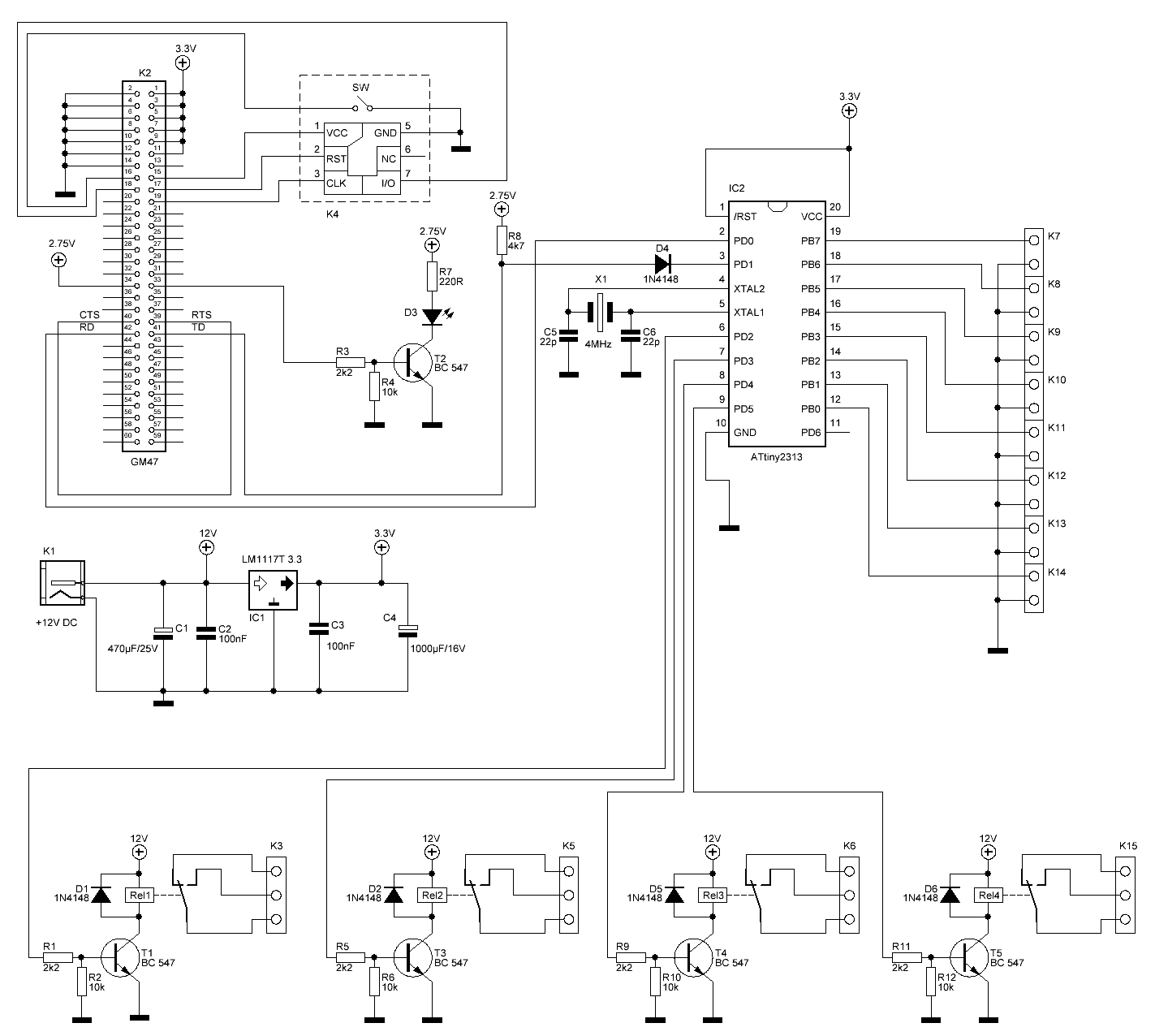
Picture 2: The schematic diagram of SMS remote control v3.0 (click to enlarge).

The schematic diagram.

This circuit is constituted by an AVR micro-controller (ATtiny2313) at 4MHz, the GM-47 GSM module, a SIM card and 4 relays. The GM-47 module works at 3.3V and is powered by the voltage stabilizer IC1. The micro-controller IC2 can work with power from 2.7V-5.5V when the speed is under 10MHz. So we power it at 3.3V because this is the voltage level that works GM-47 module. The data connection between GM-47 and ATtiny2313 is done at 9600 bps. The voltage level for this comunication is 3.3V from AVR's side and 2.7V from GM-47 side. Because of this voltage difference I used the T5 transistor to do the voltage level adaptation.

The connection of the SIM card with the GM-47 is been made by the SIM-holder K15 and the presence of the SIM card into the SIM-holder is been made by the swich SW on SIM-holder. The LED D6 when it flases, indicates that the connection to the cell phone network has been done properly. When the module cannot been connected to any cell phone network, the LED stays always ON (it's not blinking).

The GM-47 has digital and analog inputs-outputs it self but I didn't use them to avoid a malfunction with the danger of destroying the GSM module.

What the AVR micro-controller does.

After you power-on the circuit the IC2 (ATtiny2313) waits until GM-47 is initiallized, by reading the SIM card and connects to the GSM network that SIM card supports. After the connection to the network, the AVR sends the command to select the GM-47 memory as SMS storage memory. If the answer of the module is not the AVR sends again the same command. If the answer is the AVR sends the next command . This command says to the module to read the SMS as text and not as PDU format that we used in the past with T10s cell phone. The next command is that removes some information from the SMS, like SMS server's phone number and the date and time. This is done to make the SMS smaller to be handled easiest by the AVR. The next command is to read the SMS that is stored in the first memory address of the GM-47.

If there is an SMS, the AVR reads it and checks if there is the correct password. Initially the password is 1234 and can be changed by the user. Then, checks if the next character is the "*" (star). This symbol means: "Change the password with the following 4 numbers or letters". Then is searching to find the words . When "X" means the relay number (1-4) and "Y" means 0 or 1 (On or OFF). For example command means "Arm the 2nd relay" and means "Disarm the 3rd relay". After that the AVR checks again the SMS to see if there is the word with small , capital or mixed letters written in SMS. If there is, the AVR reads the status of the switches (Open or Closed) and the status of the relays (ON or OFF) and sends back an SMS to the person who sent the initial SMS. Obviously, your SIM card must have credits to send SMS!

At the end the AVR deletes the SMS from the GM-47 first storage address and starts over sending again the AT commands .

Sending an SMS to the remote control

You can send an SMS from any cell phone to the remote control by following one of the above command syntax:

A) 1234*5678 Relay1=1 Relay2=0 Relay3=1 Relay4=1 Status

B) 1234 Relay1=1 Relay2=0 Relay3=1 Relay4=1 Status

C) 1234 1=1 2=0 3=1 4=1 Status

D) 1234 Status

E) 1234 Relay2=0

In case A we have the maximum of selections. We send the initial password 1234 and we change it to 5678. We arm the relay-1, relay-3, relay-4 and disarm the relay-2. Moreover, by writing the word we ask for the status of the 8 swiches and the status of the 4 relays.

In case B we arm the relay-1, relay-3, relay-4, disarm the relay 2 and ask for the status of the relays and the switches.

In case C we do the same bypassing the words . We write the number of the relay we want to change and the status we want to have for this relay. for example case C says: armed the relays 1,3,4 and disarmed the relay 2. Moreover, we ask for the status.

In case D we ask only for the status of relays and switches.

In case E we change the status of only one relay. In this case relay-2 will be disarmed.

Piucture 5: The placement of the GM-47 module on the PCB. See the yellow thin film I put under the connector. This film is been put to protect the circuit from shortcuts between copper strip and the connector.

Via

Read MoreRangkaian SMS Remote Controller V3.0